
Suzanne & Darcy
Member Since 2020
I see you gave 9.5 this morning. Let’s see how he does on that dose. It will give us a clue as to how much to increase (if needed.)


He seems to be doing well right now!I see you gave 9.5 this morning. Let’s see how he does on that dose. It will give us a clue as to how much to increase (if needed.)
Thank you! My phone is being difficult and not allowing me to match the color. I will try to do that on my iPad later this weekend!He was rising to the 80. Put all the numbers in the Ss. All I can see is 55. Put the 55 in the +11 cell and the 80 in the PMPS since that would be the actual preshot number. And put the other numbers in at the appropriate places. Put the 4 units, obviously, in the units cell.
Here’s the detailed information on how to enter those numbers on your spreadsheet.
More Advanced Recording
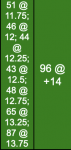
Sometimes it is necessary to stall at PS if the BG is too low to shoot and tests are taken every 20-30 minutes apart and must be recorded. The BGs are then “stacked” as shown below and, in this case, recorded in the +11 column so the PMPS, which was at +14 can be recorded in the PMPS column:
The above tells anyone looking at the SS that testing for PMPS began at +11.75 but the BG was too low; subsequent testing every 15 minutes occurred until the Caregiver felt the BG was safe enough to shoot at +14.
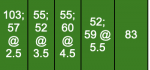
Additional testing might also occur during the cycle and should be recorded as shown below:
In the example above, the first test of 103 was taken at +2 followed by another test (57) at +2.5. Two tests were taken from +3 to +4 and are recorded in the +3 column. Two tests were taken from +4 to +5 and are recorded in the +4 column; two tests were taken from +5 to +6 and recorded in the +5 column. The last test was taken at +6 and recorded in that column.
It will be necessary to manually color in the cells when recording more than just a whole number in the cell. To do this:
- record the data in the correct cell (e.g. 185 @ +3.25)
- select the color from the ranges at the top of the SS which coincides for the test (e.g. 185 would be blue)
- in the SS toolbar at the top, click on the icon which looks like a pitcher which should also show the text “fill color” when you move the arrow over it
- next, in the SS toolbar at the top, click on the underscored A to the left of the pitcher; this should show the text “text color” when you move the arrow over it.
Me too!!! But boy is it confusing! I just tested him 1 hour after PM shot and he is 101! We just did a token dose of 4.I’m excited to see how well he’s doing.
Sure. No worries.Thank you! My phone is being difficult and not allowing me to match the color. I will try to do that on my iPad later this weekend!
That’s because his BG is rising before the evening shot kicks in at about +2. It’s natural for it to rise. He seems to have a very short bounce after some lower numbers and so trends downward all during the cycle… all the way toward PMPS. The whole thing with him not having a normal curve lately is making it more challenging to keep to a dose.Me too!!! But boy is it confusing! I just tested him 1 hour after PM shot and he is 101! We just did a token dose of 4.
I’ve learned so much from this message board. I can’t believe we’ve been doing this for almost 6 months! Having to tweak his dose lately is what is really messing with my head. I just don’t know how safe it is!That’s because his BG is rising before the evening shot kicks in at about +2. It’s natural for it to rise. He seems to have a very short bounce after some lower numbers and so trends downward all during the cycle… all the way toward PMPS. The whole thing with him not having a normal curve lately is making it more challenging to keep to a dose.
Good morning! Just now getting to that since we had to stall so long 372 this morningWhat’s the AMPS this morning?
 going back up to 9.5u.
Hey Suzanne! You know, I thought about that. I can decrease back to 10 tonight if that’s not a problem. It would definitely make me feel better. And yes! They are super frustrating. We just can’t seem to get a grip on them.Hey. How is everything? Stoney’s spreadsheet just popped up on my phone so I looked at it. I would be extremely cautious about i creasing to 10.5 like you did — he already had a lime green on 10 units so, at the very least, the dose should be held for a longer time before considering an increase.
His numbers are so frustrating! I see that.
Thank you, that’s sweet. He’s sitting at 141 right now, about 5 minutes before PMPS. I am planning on testing again right before I shoot, but plan on giving 6u only because I volunteered us to help load a truck of sand. (Why McKenzie, WHY??Well, I just worry that he will do one of his slides down into green and go lime again. Good thing I know you keep a close eye on him! It may be okay, since he’s already at 10.5 now.
 ) the we are grabbing a bite to eat. I know I will not be home for testing and a snack at +2, but don’t want to skip or give a full dose with him being fairly low, at least for him.
Yep. You know better than a token dose.Thank you, that’s sweet. He’s sitting at 141 right now, about 5 minutes before PMPS. I am planning on testing again right before I shoot, but plan on giving 6u only because I volunteered us to help load a truck of sand. (Why McKenzie, WHY??
Editing to add that he’s now at 163. I feel comfortable sticking with the 6u and going to 10u in the morning. I think a token dose is too low for him at 10-25%.
 I was nervous shooting at 118, but he is doing well! I hope he keeps this trend going. I am quite nervous as I am returning to the office tomorrow and he refuses to eat from the automatic feeder we have…
He is!! I’m super happy. But worried his PMPS will be high from a bounce. :/ I can’t get too worked up now since we don’t know if that will actually happen. And I’m not sure! I think it might be a volume issue, like he doesn’t hear when it goes off. I need to see if there is a volume selection on the app. When I put him in front of it he seems weary. But if I pet him, he’ll eat out of it! I would have to leave about an hour and a half after his shot time and won’t get back til pretty much shot time. I can try that, I do worry that he doesn’t know how to graze (we’ve never let them do that) and will just eat it in one sitting! One of our other cats is very food motivated so I’m worried he’ll eat Stoney’s portion as well!He’s doing so well! What do you think it is about the auto feeder that he doesn’t like? I wonder if a different kind would work? But anyway, tomorrow is the big day. How long after his shot will you leave for work? When will you be home (how many hours after the shot? Can you just leave a bowl of low carb wet food sitting out for him to graze upon? I know you have other cats, but maybe just leave more and they can all graze?
I’m thinking tonight might be a reduced dose again! Just checked him at +11 and he is at 82.He’s doing so well! What do you think it is about the auto feeder that he doesn’t like? I wonder if a different kind would work? But anyway, tomorrow is the big day. How long after his shot will you leave for work? When will you be home (how many hours after the shot? Can you just leave a bowl of low carb wet food sitting out for him to graze upon? I know you have other cats, but maybe just leave more and they can all graze?
His PMPS is 79. We can’t stall due to going to the office, so we are feeding and giving a small dose. I’m not sure what the dose will be but most likely be around 4 or 5u. Is that a mistake or should we go higher?I’m thinking tonight might be a reduced dose again! Just checked him at +11 and he is at 82.
 ) and hungry but he can’t eat just yet.
I knew it wouldn’t be enough but was hopeful. Going forward, I know better than to do less than half of his dose. It just doesn’t touch him. He is smoothly coasting down, his +4 was 271, so we are getting somewhere.I’m glad you didn’t have to go in today. I was pretty sure 3 units wasn’t going to be enough, but I didn’t want to be discouraging last night. It’s okay.
When do you think you will have to really go back into the office? Will it be tomorrow?
