
Suzanne & Darcy
Member Since 2020
I see you gave 9.5 this morning. Let’s see how he does on that dose. It will give us a clue as to how much to increase (if needed.)


He seems to be doing well right now!I see you gave 9.5 this morning. Let’s see how he does on that dose. It will give us a clue as to how much to increase (if needed.)
Thank you! My phone is being difficult and not allowing me to match the color. I will try to do that on my iPad later this weekend!He was rising to the 80. Put all the numbers in the Ss. All I can see is 55. Put the 55 in the +11 cell and the 80 in the PMPS since that would be the actual preshot number. And put the other numbers in at the appropriate places. Put the 4 units, obviously, in the units cell.
Here’s the detailed information on how to enter those numbers on your spreadsheet.
More Advanced Recording
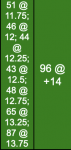
Sometimes it is necessary to stall at PS if the BG is too low to shoot and tests are taken every 20-30 minutes apart and must be recorded. The BGs are then “stacked” as shown below and, in this case, recorded in the +11 column so the PMPS, which was at +14 can be recorded in the PMPS column:
The above tells anyone looking at the SS that testing for PMPS began at +11.75 but the BG was too low; subsequent testing every 15 minutes occurred until the Caregiver felt the BG was safe enough to shoot at +14.
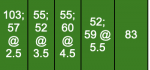
Additional testing might also occur during the cycle and should be recorded as shown below:
In the example above, the first test of 103 was taken at +2 followed by another test (57) at +2.5. Two tests were taken from +3 to +4 and are recorded in the +3 column. Two tests were taken from +4 to +5 and are recorded in the +4 column; two tests were taken from +5 to +6 and recorded in the +5 column. The last test was taken at +6 and recorded in that column.
It will be necessary to manually color in the cells when recording more than just a whole number in the cell. To do this:
- record the data in the correct cell (e.g. 185 @ +3.25)
- select the color from the ranges at the top of the SS which coincides for the test (e.g. 185 would be blue)
- in the SS toolbar at the top, click on the icon which looks like a pitcher which should also show the text “fill color” when you move the arrow over it
- next, in the SS toolbar at the top, click on the underscored A to the left of the pitcher; this should show the text “text color” when you move the arrow over it.
Me too!!! But boy is it confusing! I just tested him 1 hour after PM shot and he is 101! We just did a token dose of 4.I’m excited to see how well he’s doing.
Sure. No worries.Thank you! My phone is being difficult and not allowing me to match the color. I will try to do that on my iPad later this weekend!
That’s because his BG is rising before the evening shot kicks in at about +2. It’s natural for it to rise. He seems to have a very short bounce after some lower numbers and so trends downward all during the cycle… all the way toward PMPS. The whole thing with him not having a normal curve lately is making it more challenging to keep to a dose.Me too!!! But boy is it confusing! I just tested him 1 hour after PM shot and he is 101! We just did a token dose of 4.
I’ve learned so much from this message board. I can’t believe we’ve been doing this for almost 6 months! Having to tweak his dose lately is what is really messing with my head. I just don’t know how safe it is!That’s because his BG is rising before the evening shot kicks in at about +2. It’s natural for it to rise. He seems to have a very short bounce after some lower numbers and so trends downward all during the cycle… all the way toward PMPS. The whole thing with him not having a normal curve lately is making it more challenging to keep to a dose.