

JeffJ
Member Since 2016
Here are some screenshots
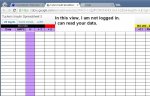
1. google sheet - not logged in.JPG
in this case you have gone to google, but you are not logged in yet
There will NOT be the 9 little squares or a logo in the upper right.
2. google logged in.JPG
Now you are logged in. From this point we can select "google drive"
3. Getting to google drive.JPG
Now we will go to google drive
4. (not shown)
I have business and personal files. So no screenshot.
You will see a list of files in your google drive.
One should be the spreadsheet.
Just click it.
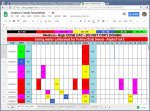
5. Leo's spreadsheet - I am logged in.JPG
Now you are logged into the google sheet.
You can modify the cells now. Just type in the numbers.
Google sheets and google drive are "live". There is no save.
Every time you type something it saves during that second. Cool!
1. google sheet - not logged in.JPG
in this case you have gone to google, but you are not logged in yet
There will NOT be the 9 little squares or a logo in the upper right.
2. google logged in.JPG
Now you are logged in. From this point we can select "google drive"
3. Getting to google drive.JPG
Now we will go to google drive
4. (not shown)
I have business and personal files. So no screenshot.
You will see a list of files in your google drive.
One should be the spreadsheet.
Just click it.
5. Leo's spreadsheet - I am logged in.JPG
Now you are logged into the google sheet.
You can modify the cells now. Just type in the numbers.
Google sheets and google drive are "live". There is no save.
Every time you type something it saves during that second. Cool!




 .
.