Blue AMPS Hi 11/1

Status
Not open for further replies.

Patty and Blue GA & Brat

Member Since 2020
https://www.felinediabetes.com/FDMB/threads/blue-530-amps-10-31.237869/

Morning. No surprise Blue is Hi again. I dosed him a little under .50 since I don't
have a caliper.

I watched the videos that were posted. My daughter came in as I was watching
the second one and said "do they know who they're talking to?". She's still
cracking up. I'll try to get one either today or tomorrow.

Blue kept waking me up last night yelling loudly. I'm starting to get worried. He
has never yelled so much.

Is there somewhere to save information that is in threads so you can refer back?

Hope you are all well and your furkids too.
 
Good morning Patty. I’m glad you increased. F you click on your aviator you will see messages. If you click on that all the messages you ever wrote are there in the chronological order as well as answers from others. When the copy of answers are emailed to me I put them in a folder in my email labeled FDMB to refer to easily.
 
Hi Patty,

I'm sorry to see Blue so high again this morning. :(

Is there somewhere to save information that is in threads so you can refer back?
The best place to keep brief notes of behavioural observations and clincal signs is in the spreadsheet remarks because the BG levels can provide context (and vice versa).

If you want to keep useful info from threads (larger sections of text) in one place, then I'd suggest setting up a 'scrapbook' document in Google Drive:

1. At the top of Blue's spreadsheet, click on File.

2. From the dropdown menu select New.

3. From the second dropdown menu select Document.

This will open a new WP document for you. From then on you can copy/paste helpful posts and links from Blue's threads into the document and it will be all in one place, easy to search, and available across all your devices. (Note: To edit the document on a tablet you need to be signed in to Google Drive and also need to download the Google Docs app, and I assume similar would apply on a smartphone.)


Suggestion - Using the Document Outline function to make things easier to find:

The Document Outline function easily creates a 'table of contents' for the document. Here's how:

1. To turn on the document outline display (laptop/desktop), click on the following icon to the left of the document page:

upload_2020-11-1_18-6-45.png


Note: To display the document outline on a tablet you need to click the menu icon (3 vertical dots) at the top right of the device display and then select it from the menu. The screen will split to show the document text (upper window) and the document outline (lower window).

2. Before you copy/paste a new section of text into the scrapbook document, type a heading that describes the content of the post you're copying, e.g:

Feeding / Steering Plan for Blue​

3. Copy/paste the text from the FDMB thread into the scrapbook document. It's also helpful to copy/paste the URL for the thread itself so that you can quickly open it and revisit the full conversation if required, e.g:


Feeding / Steering Plan for Blue​

xxxxxxxx copy/pasted text xxxxxxxx

https://xxxxxxxx copy/pasted URL xxxxxxxx​


4. Next, click the cursor anywhere on your heading text.

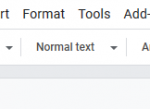
5. To the left of the formatting toolbar at the top of the document you'll see the Paragraph Style option. (Need to have tablet in landscape orientation.)

upload_2020-11-1_18-0-16.png


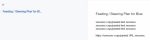
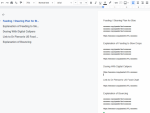
Click on Normal Text and then from the dropdown menu select Heading 3. This will automatically add the heading description to the document outline. You should see the heading appear in the list to the left of the page, e.g:

upload_2020-11-1_18-11-31.png


(NB: On a tablet, the headings appear in the Outline window in the lower part of the screen.)

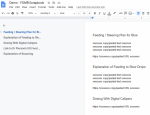
6. As you add more items and headings to the scrapbook the document outline will automatically update to include a list of all your topics. To jump to a particular topic, just click on the heading name in the document outline list and you'll automatically be taken to the section you're interested in.

upload_2020-11-1_18-35-5.png


7. You can also click on the Edit menu then select Find and Replace from the dropdown list to search for particular text in the document. (Keyboard shortcut for the Find function on PC is CTRL-F.) These functions also work in Google spreadsheets.


Mogs
.

 

Attachments

  • upload_2020-11-1_18-0-16.png
    upload_2020-11-1_18-0-16.png
    2.6 KB · Views: 155
  • upload_2020-11-1_18-6-45.png
    upload_2020-11-1_18-6-45.png
    785 bytes · Views: 157
  • upload_2020-11-1_18-11-31.png
    upload_2020-11-1_18-11-31.png
    77.7 KB · Views: 139
  • upload_2020-11-1_18-18-15.png
    upload_2020-11-1_18-18-15.png
    349.4 KB · Views: 116
  • upload_2020-11-1_18-35-5.png
    upload_2020-11-1_18-35-5.png
    364.1 KB · Views: 134
Last edited:
I got the new document. Will it be linked to the SS?
No, it's separate to the spreadsheet and it's private (unless you decide to change permissions to let someone with the link view it). You can keep the browser window running FDMB, the scrapbook document and the spreadsheet all open at the same time and switch back and forth between them as and when you need.


Mogs
.
 
Would he eat his mid-cycle meal a little early for you, Patty (assuming that fits with what you're up to at the moment)?

After that drop he may bounce back up again later in the cycle.


Mogs
.


With the time change yes, I already fed the troops. This time change is messing with my brain. I think I need to set some alarms...oh, I have cats so a built in alarm of meows.
 
Okay. Got it. I posted the feeding schedule you made in case Blue gets low. I'll look through other stuff to save. I should have asked the question sooner. :(
Ace! I hope it'll be a help to you, Patty. :)

I like using the outline and search functions because you don't need to worry about the order in which you add things to the scrapbook document since they make stuff really easy to find again. The scrapbook document's also a really handy place to keep a copy of links to helpful FDMB threads and URLs for helpful websites.


Mogs
.
 
Last edited:
Yes, I'm an hour ahead now for test, feed and shoot. I shot at 8:30 a.m. and p.m. but I'll probably end up at 9:00 eventually.
He's 401 +2.5 so only down a small amount. You feel good about me going to bed?

Mogs is very detailed but it was helpful to find an area I could copy and paste information. That's about as far as I've got.
Spread sheets are new to me. I'm sure I'll figure it out eventually but it's a little intimidating.
 
Ditto for me, Patty. I don’t know how you do it shooting at 9. I would shoot at 6 and often didn’t get to sleep until 1 or 2. I think you can call it a night. Sleep well.
 
Status
Not open for further replies.
Back
Top