This sticky explains how to stack the numbers in a cell when you get more than 1 test in an hour:
https://www.felinediabetes.com/FDMB/threads/how-to-use-the-spreadsheet.241653/
"More Advanced Recording
Sometimes it is necessary to stall at PS if the BG is too low to shoot and tests are taken every 20-30 minutes apart and must be recorded. The BGs are then “stacked” as shown below and, in this case, recorded in the +11 column so the PMPS, which was at +14 can be recorded in the PMPS column:
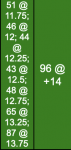
The above tells anyone looking at the SS that testing for PMPS began at +11.75 but the BG was too low; subsequent testing every 15 minutes occurred until the Caregiver felt the BG was safe enough to shoot at +14.
Additional testing might also occur during the cycle and should be recorded as shown below:
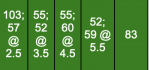
In the example above, the first test of 103 was taken at +2 followed by another test (57) at +2.5. Two tests were taken from +3 to +4 and are recorded in the +3 column. Two tests were taken from +4 to +5 and are recorded in the +4 column; two tests were taken from +5 to +6 and recorded in the +5 column. The last test was taken at +6 and recorded in that column.
It will be necessary to manually color in the cells when recording more than just a whole number in the cell. To do this:
- record the data in the correct cell (e.g. 185 @ +3.25)
- select the color from the ranges at the top of the SS which coincides for the test (e.g. 185 would be blue)
- in the SS toolbar at the top, click on the icon which looks like a pitcher which should also show the text “fill color” when you move the arrow over it
- next, in the SS toolbar at the top, click on the underscored A to the left of the pitcher; this should show the text “text color” when you move the arrow over it."





 No sharks Cosmo... Stay on the beach and close to the shore if you go surfing! It looks like it's going to be a great day for the beach!


