I am starting a brand new thread here so that you can all teach me how to download a spreadsheet, use it and post it here ....I understand the example that @Capoo showed me but I don't understand how to post it here .... I haven't got a spreadsheet saved in google yet ...... the google account thing is something new to me ... can't find easy steps to using this on the FDMB ...... too much text just washes over me ...... can you take me through it step by step please ... this is usually my thing but on paper not on a computer ..... not very good on the computer ... @Elizabeth and Bertie help please?
Lets do this step by step using your laptop. Let us know if you get stuck at a step.
Step 1: obtain a Google account
Go to www.Google.com
There should be an option to create an account or register, possibly with an icon in the upper right corner.
Once you've created it, you are logged in. Stay logged in while you continue these instructions.
Be sure to save your password someplace where you can find it again.
Step 2: Follow the instructions for getting and creating your own spreadsheet. Instructions are here.
Step 3: Enter your test data into the spreadsheet. It saves automatically.
Step 4: Sharing the spreadsheet.
The sharing options are on the Spreadsheet.
Using your laptop, in the upper right corner of the spreadsheet is a button which says Share.
Click on that.
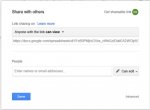
A dialog box pops up and you select "Anyone with the link can view.
Copy that link and come over to FDMB.
In the upper right corner of the screen, hover your mouse over your user ID.
Select signature.
Edit your signature by typing "Smiffiy's Spreadsheet", selecting/highlighting that text and clicking on the chain link icon,
Paste the link in the box and click Insert.
Towards the bottom is a button that says Save Changes and another which says Preview.
If you want to look at it first, select Preview.
If you're happy with it, select Save Changes.
Lets do this step by step using your laptop. Let us know if you get stuck at a step.
Step 1: obtain a Google account
Go to www.Google.com
There should be an option to create an account or register, possibly with an icon in the upper right corner.
Once you've created it, you are logged in. Stay logged in while you continue these instructions.
Be sure to save your password someplace where you can find it again.
Step 2: Follow the instructions for getting and creating your own spreadsheet. Instructions are here.
Step 3: Enter your test data into the spreadsheet. It saves automatically.
Step 4: Sharing the spreadsheet.
The sharing options are on the Spreadsheet.
Using your laptop, in the upper right corner of the spreadsheet is a button which says Share.
Click on that.
A dialog box pops up and you select "Anyone with the link can view. View attachment 20878
Copy that link and come over to FDMB.
In the upper right corner of the screen, hover your mouse over your user ID.
Select signature.
Edit your signature by typing "Smiffiy's Spreadsheet", selecting/highlighting that text and clicking on the chain link icon,
Paste the link in the box and click Insert.
Towards the bottom is a button that says Save Changes and another which says Preview.
If you want to look at it first, select Preview.
Have copied this and put it in a file so that I can ask husband to print it out for me ... thank you ...... @Capoo By the way today I managed to test Smiffy again at about 7.7 hours after her Caninsulin shot and it was 12.2 as opposed to 13.8 at the same time a few days ago ..... and this morning around the estimated time (at the moment) of her adir she instinctively went downstairs for a snack ... I am really pleased we are going in the right direction and that I did what I thought was best and now the Vet!!!
If you're happy with it, select Save Changes.
While you're in Google Drive, in the upper right is a gear symbol.
If you've time, click on that and click the help selection.
Then select "Get started with Google Drive" to read about it.
Reading over descriptions helps your brain set up "advance organizers", sort of like letting your brain start a filing system for the info.




 )
)