? 5/22/ Milo AMPS: 10.0 mmol/L/ 180 mg/dL gave 2 Units of Lantus + 2.25 4.5 mmol/L 81 mg/dL

Here is your last post for continuity https://www.felinediabetes.com/FDMB/threads/amps-2-is-3-8-mmol-l-68-mg-dl.247604/#post-2792911

I'm sorry no one mentioned to you then that with SLGS, and the numbers under 90 you need to reduce the next dose immediately by 0.25u

For now, please continue and get another test 30 minutes from your last. He is still in safe numbers, flattening out a little, so we just want to see that he has stopped dropping or is rising.
Phew...! thank you for responding! As you can see on his SS Milo is keeping me very busy these days!
Ok i will test again @ + 4 and post results.
 
You're welcome :). It's always better to have a little help. I see you're feeding 1 tsp, you may want to try 2 tsp, since so far, 1 tsp isn't really bringing him up.
Sounds good ~ will give 2 tsps @ +4 . Ok so the only sign Milo ususally give me that he is 'feeling low" is very loud
meowing, like he is in distress almost... Shortly after his AMPS/Shot/ and Meal, he was playing paper toss and
racing around the house as always. I shudder to think if i was not at home..
 
You're welcome :). It's always better to have a little help. I see you're feeding 1 tsp, you may want to try 2 tsp, since so far, 1 tsp isn't really bringing him up.
+ 4 @ 3.5 mmol/L gave 1 tsp of (15%) Gravy Lovers Chicken ( ran out of the 15 %) and 1 tsp of (12%) Turkey Feast
in Gravy Grilled. At least he didn't go any lower.. will test again in 30 min. Thanks!
 
Please do the US numbers. The majority of the board only knows the US numbers, so you'll get better and faster help, if people can decode what you're saying :oops:

You're doing great :bighug:
I see Christy is here, so I'm going to bed. This migraine is trying to kill my brain :banghead:
You're in great hands :bighug:
 
Please do the US numbers. The majority of the board only knows the US numbers, so you'll get better and faster help, if people can decode what you're saying :oops:

You're doing great :bighug:
I see Christy is here, so I'm going to bed. This migraine is trying to kill my brain :banghead:
You're in great hands :bighug:
Oh no...I'm sorry about your migraine Sasha! I too get them now and then ~ No Fun!
I am just learning how to post on SS and FDMB so not very confident in converting World
Numbers...Will give it a go and Chris and i think Bhooma said they are willing to fix US numbers
for me.. Hope you are feeling better soon, and Thanks for responding.
PS: I try to write both World # and US # when posting for help.
 
I try to write both World # and US # when posting for help.
Don't bother posting World numbers, you really will get more help with posting just the US ones. A little tip US numbers = World Numbers x 18. Or if you are on a computer, you can use this handy spreadsheet someone gave me in my early days.

Congrats on the reduction.
 

Attachments

Don't bother posting World numbers, you really will get more help with posting just the US ones. A little tip US numbers = World Numbers x 18. Or if you are on a computer, you can use this handy spreadsheet someone gave me in my early days.

Congrats on the reduction.
+ 5 = 4.2 mmol/L /75.6 Us ~ forgot..Fed 1 tsp FF Turkey in gravy (12% carbs)
Should i still monitor as he is getting higher numbers now.. Like in 1 hr perhaps! Thanks for responding.
 
+ 6 = 4.7 mmol/L / 84.6 mmol/L
BGL is rising nicely so we are good now i think..? Fed Milo his usual +6 snack of 1 tbsp FF Pate.
Seems it takes him ca. 4 hrs to "settle" his numbers.
Thank you so very much Christie! I would have been lost without you!
 
Will give it a go and Chris and i think Bhooma said they are willing to fix US numbers

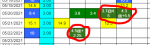
We can if we're here and have the time, but it's not that hard. Like here, on the "World" tab that you use, anytime you enter anything that's not a number (or more than 1 number), it shows fine for you
upload_2021-5-22_18-18-14.png


but on the US tab that we look at, it shows up like this:
upload_2021-5-22_18-19-0.png


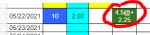
What you need to do when this happens is open the US tab, "highlight" the cells with #VALUE! in them, delete the "#value!" and then enter the correct number in US terms.

Take the 4.5 and multiply by 18....so you'd enter 81@ +2.25 in that cell on the US tab, and then do the color coding that goes with that number (dark green in this instance)

Make sense?

 

Attachments

  • upload_2021-5-22_18-15-59.png
    upload_2021-5-22_18-15-59.png
    17.9 KB · Views: 79
  • upload_2021-5-22_18-18-14.png
    upload_2021-5-22_18-18-14.png
    5.7 KB · Views: 179
  • upload_2021-5-22_18-19-0.png
    upload_2021-5-22_18-19-0.png
    6.5 KB · Views: 184
Marianna:

I'm not sure if your saw Wendy's post (#16) above. The majority of the members here are from the US. We are illiterate when it comes to any numeric system that isn't ours. (Don't even bother mentioning weights in kilos. Our eyes cross.) When most people are reading threads, they look for US numbers (mg/dL). It's rare that anyone will do the multiplication that Chris mentioned themselves. I suspect it will get more of a response if you use the US system when you're posting. (Unfortunately, not everyone will open Milo's spreadsheet to look but they will try to respond to your question so having the familiar numbers in the thread will help.)
 
Oh no...I'm sorry about your migraine Sasha! I too get them now and then ~ No Fun!
I am just learning how to post on SS and FDMB so not very confident in converting World
Numbers...Will give it a go and Chris and i think Bhooma said they are willing to fix US numbers
for me.. Hope you are feeling better soon, and Thanks for responding.
PS: I try to write both World # and US # when posting for help.
Hi Sasha! I hope that you are feeling better! Thanks' for the heads up on converting # on the US SS.
I managed to do it finally ~ Yay!
 
Don't bother posting World numbers, you really will get more help with posting just the US ones. A little tip US numbers = World Numbers x 18. Or if you are on a computer, you can use this handy spreadsheet someone gave me in my early days.

Congrats on the reduction.
 
Don't bother posting World numbers, you really will get more help with posting just the US ones. A little tip US numbers = World Numbers x 18. Or if you are on a computer, you can use this handy spreadsheet someone gave me in my early days.

Congrats on the reduction.
Hi and thank you for the reply. I have posted on the US SS and converted the World # to US #.
Hopefully i will get a better response when i need advice!
 
We can if we're here and have the time, but it's not that hard. Like here, on the "World" tab that you use, anytime you enter anything that's not a number (or more than 1 number), it shows fine for you
View attachment 61001

but on the US tab that we look at, it shows up like this:
View attachment 61002

What you need to do when this happens is open the US tab, "highlight" the cells with #VALUE! in them, delete the "#value!" and then enter the correct number in US terms.

Take the 4.5 and multiply by 18....so you'd enter 81@ +2.25 in that cell on the US tab, and then do the color coding that goes with that number (dark green in this instance)

Make sense?
Hi Chris!
Thank you for explaining and giving some "visual" images as well.. that really helped me.
Also explaining what you guy see on the US Spreadsheet.(or can't see) from the World SS makes sense now.
I have now converted the World Numbers to the US spreadsheet as well.( Yay!)
2 Questions: on US SS do you always use "full numbers"? World Numbers has like 6.5 etc
US has One number like" 450" no commas and point. something..
How do i edit "Remarks" on the Spread Sheet again? Every time i try to add info later in the day everything
that was written prior just disappears! And i have redo it all. ( i asked you before but do not remember how)
That's the only thing i cant figure out on the Spread Sheet yet.
Thanks.
 
Marianna:

I'm not sure if your saw Wendy's post (#16) above. The majority of the members here are from the US. We are illiterate when it comes to any numeric system that isn't ours. (Don't even bother mentioning weights in kilos. Our eyes cross.) When most people are reading threads, they look for US numbers (mg/dL). It's rare that anyone will do the multiplication that Chris mentioned themselves. I suspect it will get more of a response if you use the US system when you're posting. (Unfortunately, not everyone will open Milo's spreadsheet to look but they will try to respond to your question so having the familiar numbers in the thread will help.)

Hi, and thanks for explaining the US Spread Sheet #... I have now converted everything from World to US
on my spreadsheet. For sure that makes it easier for you guys across the pond, and hopefully i will get
more response when posting. A win win for sure!
 
on US SS do you always use "full numbers"? World Numbers has like 6.5 etc
US has One number like" 450" no commas and point. something..

Just use 1 number...if you convert yours from (example) 8.6 to ours, that would be 154.8....just round to the nearest whole number....in this case, 155

How do i edit "Remarks" on the Spread Sheet again? Every time i try to add info later in the day everything
that was written prior just disappears! And i have redo it all. ( i asked you before but do not remember how)

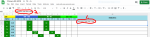
As you're typing your remarks (#1), look at the line above (#2)
upload_2021-5-24_18-39-45.png


Now if you want to add more to your remarks, "highlight" the remarks box, but don't start typing there (#1)....go to the #2 line, put your cursor at the end of whatever is there already and add the new information.
upload_2021-5-24_18-47-36.png
 

Attachments

  • upload_2021-5-24_18-39-45.png
    upload_2021-5-24_18-39-45.png
    82.2 KB · Views: 189
  • upload_2021-5-24_18-47-36.png
    upload_2021-5-24_18-47-36.png
    78.3 KB · Views: 161
Just use 1 number...if you convert yours from (example) 8.6 to ours, that would be 154.8....just round to the nearest whole number....in this case, 155


As you're typing your remarks (#1), look at the line above (#2)
View attachment 61020

Now if you want to add more to your remarks, "highlight" the remarks box, but don't start typing there (#1)....go to the #2 line, put your cursor at the end of whatever is there already and add the new information.
View attachment 61021

Hi Chris, once more... thank you for replying and taking time out to do a "visual' explanation.
Because of your kindness and patience i have (finally!) managed to get the hang of" the mysteries of the Spreadsheet" ~ Lol~
I'm forever grateful.
 
Back
Top