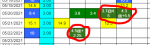
We can if we're here and have the time, but it's not that hard. Like here, on the "World" tab that you use, anytime you enter anything that's not a number (or more than 1 number), it shows fine for you
View attachment 61001
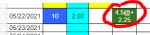
but on the US tab that we look at, it shows up like this:
View attachment 61002
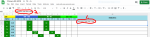
What you need to do when this happens is open the US tab, "highlight" the cells with #VALUE! in them, delete the "#value!" and then enter the correct number in US terms.
Take the 4.5 and multiply by 18....so you'd enter 81@ +2.25 in that cell on the US tab, and then do the color coding that goes with that number (dark green in this instance)
Make sense?



 . It's always better to have a little help. I see you're feeding 1 tsp, you may want to try 2 tsp, since so far, 1 tsp isn't really bringing him up.