

You are using an out of date browser. It may not display this or other websites correctly.
You should upgrade or use an alternative browser.
You should upgrade or use an alternative browser.
12/04 Buddy AMPS 137 +2 102 +4.5 87 +5.5 100 +8 112 Got my ONEDROP!
- Thread starter Sandra And Buddy (GA)
- Start date

carfurby (GA)
Member Since 2012
Nice start for Buddy. I hope he surfs safely today.

Ti-Mousse (GA) Pepe (GA)
Member Since 2018
We'll see if Buddy will get a green today after that nice blue start!
BTW your Christmas avatar is so cute! Have a great day.
BTW your Christmas avatar is so cute! Have a great day.
Sandra And Buddy (GA)
Member Since 2019
So close! +2 102

Debra and Yoyo
Member Since 2018

Sue and Luci
Member Since 2017
Glad things are calm at your house  He's just about to cross that line...come on Buddy...you can do it!
He's just about to cross that line...come on Buddy...you can do it!
Sonia & Leo
Member Since 2018
Looking pretty green with meter variance and all...

Have a wonderful day Sandra and Buddy!
Have a wonderful day Sandra and Buddy!

Tina Marie (GA) and Jan
Member Since 2019
Looking good Buddy! Once I got a 99, and just knew it would be over 100 if I checked again; I felt lucky
Sandra And Buddy (GA)
Member Since 2019
Got my Onedrop meter! All set up, did a control test, First test, Error LOL not enough blood but was my fault, I pulled it away to quickly and didn't grab enough. Second test was 100, I checked it against my current meter (had to poke again) and got a 102. I am happy with that!
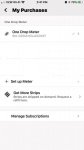
@Sue and Luci I can't find where to order strips, the my purchases and get strip options are not there. Ideas?
@Sue and Luci I can't find where to order strips, the my purchases and get strip options are not there. Ideas?
Sue and Luci
Member Since 2017
Got my Onedrop meter! All set up, did a control test, First test, Error LOL not enough blood but was my fault, I pulled it away to quickly and didn't grab enough. Second test was 100, I checked it against my current meter (had to poke again) and got a 102. I am happy with that!
@Sue and Luci I can't find where to order strips, the my purchases and get strip options are not there. Ideas?
If you have the app loaded on your phone, you'll sync your meter with your app and load all the readings to it.
Under your 'Account' you'll see the options to Manage your subscription/purchases - I'll see if I can gather up a screenshot for you.
Select 'Get More Strips' to place your order.
Attachments
Last edited:
Sandra And Buddy (GA)
Member Since 2019
If you have the app loaded on your phone, you'll sync your meter with your app and load all the readings to it.
Under your 'Account' you'll see the options to Manage your subscription/purchases - I'll see if I can gather up a screenshot for you.
Select 'Get More Strips' to place your order.
View attachment 49557
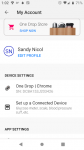
Hmm, Yeah min is pretty different from that. My app is updated too.
Attachments
Sue and Luci
Member Since 2017
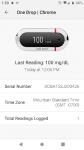
Click on your meter name... next menu includes ordering info.
Sandra And Buddy (GA)
Member Since 2019
Click on your meter name... next menu includes ordering info.
I swear I have been through every menu LOL I have an email in to support. I'm sure I am just missing something.
Attachments
Sue and Luci
Member Since 2017
Were you able to sync with the meter?I swear I have been through every menu LOL I have an email in to support. I'm sure I am just missing something.
View attachment 49559
Sandra And Buddy (GA)
Member Since 2019
Were you able to sync with the meter?
Yes, I did just get off the phone with them, They have to update my account to show the option. In the meantime they are expediting me 300 strips.
Yay!
Sue and Luci
Member Since 2017
YEAH! Glad you got it straightened outYes, I did just get off the phone with them, They have to update my account to show the option. In the meantime they are expediting me 300 strips.